Middleware: Skill
Skill Middleware provides Skill support for Eino ADK Agents, enabling Agents to dynamically discover and use predefined skills to complete tasks more accurately and efficiently.
What is a Skill
A Skill is a folder containing instructions, scripts, and resources that Agents can discover and use on demand to extend their capabilities. The core of a Skill is a SKILL.md file containing metadata (at least name and description) and instructions guiding the Agent to perform specific tasks.
my-skill/
├── SKILL.md          # Required: Instructions + metadata
├── scripts/          # Optional: Executable code
├── references/       # Optional: Reference documentation
└── assets/           # Optional: Templates, resources
Skills use Progressive Disclosure to efficiently manage context:
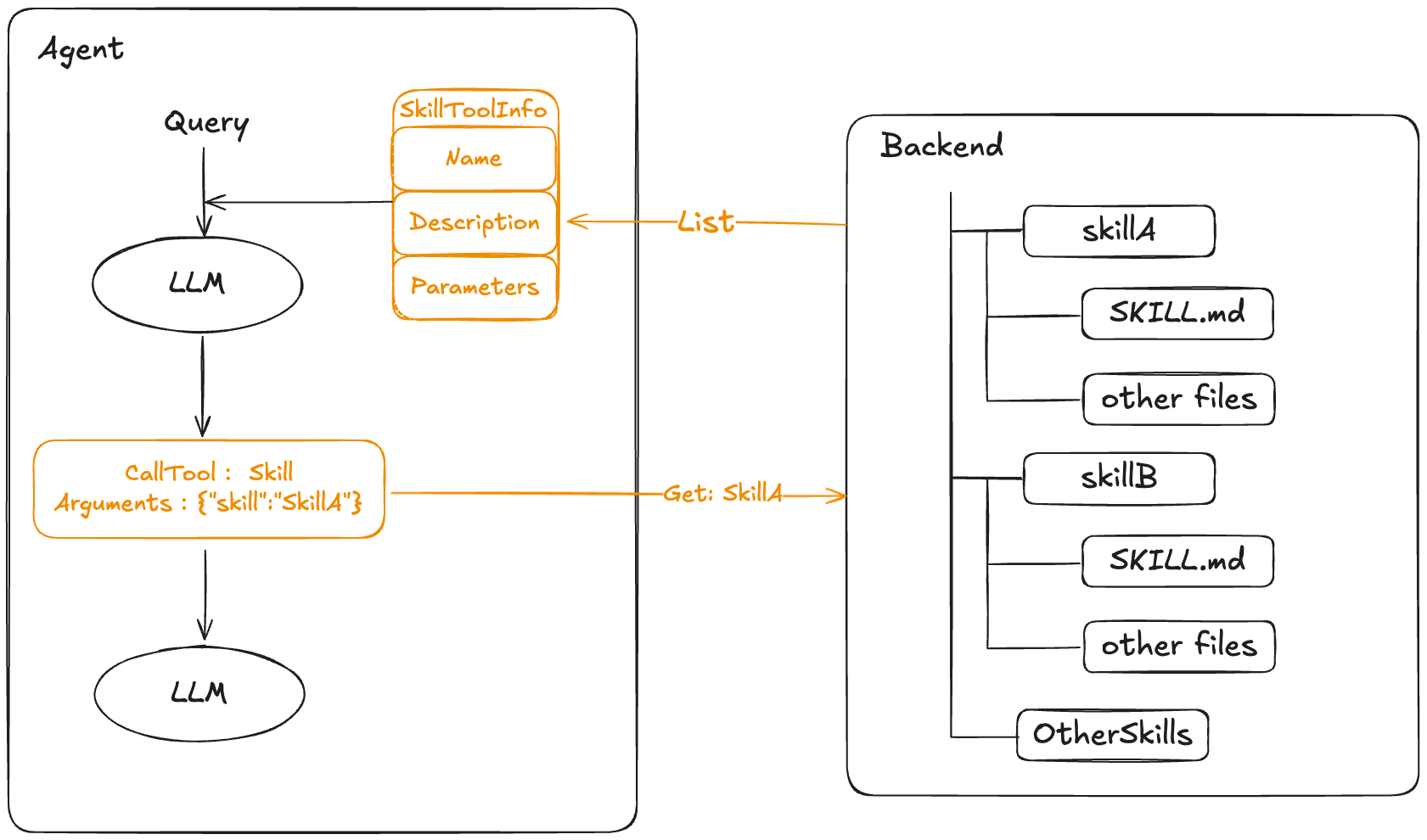
- Discovery: At startup, the Agent only loads the name and description of each available Skill, enough to determine when the Skill might be needed
- Activation: When a task matches a Skill’s description, the Agent reads the complete
SKILL.mdcontent into context - Execution: The Agent follows instructions to execute the task, and can also load other files or execute bundled code as needed. This approach keeps the Agent responsive while allowing on-demand access to more context.
💡 Ref: https://agentskills.io/home
Interface Introduction
FrontMatter
The metadata structure of a Skill, used for quick display of Skill information during discovery phase, avoiding loading full content:
type FrontMatter struct {
    Name        string      `yaml:"name"`
    Description string      `yaml:"description"`
    Context     ContextMode `yaml:"context"`
    Agent       string      `yaml:"agent"`
    Model       string      `yaml:"model"`
}
| Field | Type | Description |
Name | string | Unique identifier for the Skill. Agent calls the Skill by this name. Recommend using short, meaningful names (e.g.,pdf-processing, web-research). Corresponds to the namefield in SKILL.md frontmatter |
Description | string | Description of Skill functionality. This is the key basis for Agent to decide whether to use the Skill, should clearly explain applicable scenarios and capabilities. Corresponds to thedescriptionfield in SKILL.md frontmatter |
Context | ContextMode | Context mode. Possible values:fork(copy history messages to create new Agent for execution), isolate(create new Agent with isolated context for execution). Leave empty for inline mode (directly return Skill content) |
Agent | string | Specify the Agent name to use. Used withContextfield, gets the corresponding Agent factory function via AgentHub. Leave empty to use default Agent |
Model | string | Specify the model name to use. Gets the corresponding model instance viaModelHub. In Context mode, passed to Agent factory; in inline mode, switches the model used by subsequent ChatModel calls |
ContextMode
const (
    ContextModeFork    ContextMode = "fork"    // Copy history messages
    ContextModeIsolate ContextMode = "isolate" // Isolate context
)
| Mode | Description |
| Inline (default) | Skill content is returned directly as tool result, processed by current Agent |
| Fork | Create new Agent, copy current conversation history, execute Skill task independently and return result |
| Isolate | Create new Agent with isolated context (only containing Skill content), execute independently and return result |
Skill
Complete Skill structure, containing metadata and actual instruction content:
type Skill struct {
    FrontMatter
    Content       string
    BaseDirectory string
}
| Field | Type | Description |
FrontMatter | FrontMatter | Embedded metadata structure, includingName, Description, Context, Agent, Model |
Content | string | Body content after frontmatter in SKILL.md file. Contains detailed instructions, workflows, examples, etc. Agent reads this content after activating Skill |
BaseDirectory | string | Absolute path of Skill directory. Agent can use this path to access other resource files in the Skill directory (such as scripts, templates, reference docs, etc.) |
Backend
Skill backend interface, defining how skills are retrieved. The Backend interface decouples skill storage from usage, providing the following benefits:
- Flexible storage: Skills can be stored in local file system, database, remote service, cloud storage, etc.
- Extensibility: Teams can implement custom Backends as needed, such as dynamically loading from Git repository, getting from config center, etc.
- Test friendly: Can easily create Mock Backend for unit testing
type Backend interface {
    List(ctx context.Context) ([]FrontMatter, error)
    Get(ctx context.Context, name string) (Skill, error)
}
| Method | Description |
List | List metadata of all available skills. Called at Agent startup to build skill tool descriptions, letting Agent know which skills are available |
Get | Get complete skill content by name. Called when Agent decides to use a skill, returns complete Skill structure with detailed instructions |
AgentHub and ModelHub
When Skills use Context mode (fork/isolate), AgentHub and ModelHub need to be configured:
// AgentFactory creates Agent instances
type AgentFactory func(ctx context.Context, m model.ToolCallingChatModel) (adk.Agent, error)

// AgentHub provides Agent factory functions
type AgentHub interface {
    Get(ctx context.Context, name string) (AgentFactory, error)
}

// ModelHub provides model instances
type ModelHub interface {
    Get(ctx context.Context, name string) (model.ToolCallingChatModel, error)
}
NewBackendFromFilesystem
Backend implementation based on filesystem.Backend interface, reads skills from specified directory:
type BackendFromFilesystemConfig struct {
    Backend filesystem.Backend
    BaseDir string
}

func NewBackendFromFilesystem(ctx context.Context, config *BackendFromFilesystemConfig) (Backend, error)
| Field | Type | Required | Description |
| Backend | filesystem.Backend | Yes | File system backend implementation for file operations |
| BaseDir | string | Yes | Path to skills root directory. Scans all first-level subdirectories under this directory, looking for directories containingSKILL.mdfiles as skills |
How it works:
- Scans first-level subdirectories under
BaseDir - Looks for
SKILL.mdfile in each subdirectory - Parses YAML frontmatter to get metadata
- Deeply nested
SKILL.mdfiles are ignored
filesystem.Backend Implementations
The filesystem.Backend interface has the following two implementations to choose from:
Local Backend (Local File System)
Implementation based on local file system, suitable for Unix/MacOS environments:
import "github.com/cloudwego/eino-ext/adk/backend/local"

type Config struct {
    ValidateCommand func(string) error // optional
}

func NewBackend(ctx context.Context, cfg *Config) (filesystem.Backend, error)
| Field | Type | Required | Description |
| ValidateCommand | func(string) error | No | Command validation function for security checks before command execution |
Note: Only supports Unix/MacOS, does not support Windows.
Sandbox Backend (Sandbox Environment)
Implementation based on Volcengine AgentKit sandbox tool, suitable for scenarios requiring isolated execution environments:
import "github.com/cloudwego/eino-ext/adk/backend/agentkit"

type Config struct {
    AccessKeyID      string
    SecretAccessKey  string
    Region           Region  // Optional, default cn-beijing
    ToolID           string
    SessionID        string  // Provide at least one of SessionID or UserSessionID
    UserSessionID    string  // Provide at least one of SessionID or UserSessionID
    SessionTTL       int     // Optional, default 1800 seconds
    ExecutionTimeout int     // Optional
    HTTPClient       *http.Client // Optional
}

func NewSandboxToolBackend(config *Config) (filesystem.Backend, error)
| Field | Type | Required | Description |
| AccessKeyID | string | Yes | Volcengine Access Key ID |
| SecretAccessKey | string | Yes | Volcengine Secret Access Key |
| Region | Region | No | Region, supportscn-beijing(default) and cn-shanghai |
| ToolID | string | Yes | Sandbox Tool ID |
| SessionID | string | No | Session ID, provide at least one of SessionID or UserSessionID |
| UserSessionID | string | No | User Session ID, provide at least one of SessionID or UserSessionID |
| SessionTTL | int | No | Session TTL (seconds), range 60-86400, default 1800 |
| ExecutionTimeout | int | No | Code execution timeout (seconds) |
For more information see: Volcengine AgentKit Documentation
LocalBackend Built-in local file system backend implementation, reads skills from specified directory:
type LocalBackendConfig struct {
    BaseDir string
}

func NewLocalBackend(config *LocalBackendConfig) (*LocalBackend, error)
| Field | Type | Required | Description |
BaseDir | string | Yes | Path to skills root directory. LocalBackend scans all subdirectories under this directory, looking for directories containingSKILL.mdfiles as skills |
How it works:
- Scans first-level subdirectories under
BaseDir - Looks for
SKILL.mdfile in each subdirectory - Parses YAML frontmatter to get metadata
Initialization
Create Skill Middleware (recommend using NewChatModelAgentMiddleware):
func NewChatModelAgentMiddleware(ctx context.Context, config *Config) (adk.ChatModelAgentMiddleware, error)
Config is configured as:
type Config struct {
    // Backend skill backend implementation, required
    Backend Backend

    // SkillToolName skill tool name, default "skill"
    SkillToolName *string

    // AgentHub provides Agent factory functions for Context mode
    // Required when Skill uses "context: fork" or "context: isolate"
    AgentHub AgentHub

    // ModelHub provides model instances for Skills specifying models
    ModelHub ModelHub

    // CustomSystemPrompt custom system prompt
    CustomSystemPrompt SystemPromptFunc

    // CustomToolDescription custom tool description
    CustomToolDescription ToolDescriptionFunc
}
| Field | Type | Required | Default | Description |
Backend | Backend | Yes | Skill backend implementation. Responsible for skill storage and retrieval, can use built-inLocalBackendor custom implementation | |
SkillToolName | *string | No | "skill" | Skill tool name. Agent calls skill tool by this name. If your Agent already has a tool with the same name, you can customize the name through this field to avoid conflicts |
AgentHub | AgentHub | No | Provides Agent factory functions. Required when Skill usescontext: forkor context: isolate | |
ModelHub | ModelHub | No | Provides model instances. Used when Skill specifies themodelfield | |
CustomSystemPrompt | SystemPromptFunc | No | Built-in prompt | Custom system prompt function |
CustomToolDescription | ToolDescriptionFunc | No | Built-in description | Custom tool description function |
Quick Start
Taking loading pdf skill from local as an example, complete code at https://github.com/cloudwego/eino-examples/tree/alpha/08/adk/middlewares/skill.
- Create skills directory in working directory:
workdir/
├── skills/
│   └── pdf/
│        ├── scripts
│        │   └── analyze.py
│        └── SKILL.md
└── other files
- Create local filesystem backend, and create Skill middleware based on backend:
import (
    "github.com/cloudwego/eino/adk/middlewares/skill"
    "github.com/cloudwego/eino-ext/adk/backend/local"
)


be, err := local.NewBackend(ctx, &local.Config{})
if err != nil {
    log.Fatal(err)
}

wd, _ := os.Getwd()
workDir := filepath.Join(wd, "adk", "middlewares", "skill", "workdir")
skillBackend, err := skill.NewBackendFromFilesystem(ctx, &skill.BackendFromFilesystemConfig{
    Backend: be,
    BaseDir: skillsDir,
})
- Create local Filesystem Middleware based on backend, for agent to read skill other files and execute scripts:
import (
    "github.com/cloudwego/eino/adk/middlewares/filesystem"
)

fsm, err := filesystem.NewMiddleware(ctx, &filesystem.Config{
    Backend:                          be,
    WithoutLargeToolResultOffloading: true,
})
- Create Agent and configure middlewares
agent, err := adk.NewChatModelAgent(ctx, &adk.ChatModelAgentConfig{
    Name:        "LogAnalysisAgent",
    Description: "An agent that can analyze logs",
    Instruction: "You are a helpful assistant.",
    Model:       cm,
    Middlewares: []adk.ChatModelAgentMiddleware{fsm, skillMiddleware},
})
- Call Agent and observe results
runner := adk.NewRunner(ctx, adk.RunnerConfig{
    Agent: agent,
})

input := fmt.Sprintf("Analyze the %s file", filepath.Join(workDir, "test.log"))
log.Println("User: ", input)

iterator := runner.Query(ctx, input)
for {
    event, ok := iterator.Next()
    if !ok {
       break
    }
    if event.Err != nil {
       log.Printf("Error: %v\n", event.Err)
       break
    }

    prints.Event(event)
}
Agent output:
name: LogAnalysisAgent
path: [{LogAnalysisAgent}]
tool name: skill
arguments: {"skill":"log_analyzer"}

name: LogAnalysisAgent
path: [{LogAnalysisAgent}]
tool response: Launching skill: log_analyzer
Base directory for this skill: /Users/bytedance/go/src/github.com/cloudwego/eino-examples/adk/middlewares/skill/workdir/skills/log_analyzer
# SKILL.md content

name: LogAnalysisAgent
path: [{LogAnalysisAgent}]
tool name: execute
arguments:  {"command": "python3 /Users/bytedance/go/src/github.com/cloudwego/eino-examples/adk/middlewares/skill/workdir/skills/log_analyzer/scripts/analyze.py /Users/bytedance/go/src/github.com/cloudwego/eino-examples/adk/middlewares/skill/workdir/test.log"}

name: LogAnalysisAgent
path: [{LogAnalysisAgent}]
tool response: Analysis Result for /Users/bytedance/go/src/github.com/cloudwego/eino-examples/adk/middlewares/skill/workdir/test.log:
Total Errors: 2
Total Warnings: 1

Error Details:
Line 3: [2024-05-20 10:02:15] ERROR: Database connection failed.
Line 5: [2024-05-20 10:03:05] ERROR: Connection timed out.

Warning Details:
Line 2: [2024-05-20 10:01:23] WARNING: High memory usage detected.


name: LogAnalysisAgent
path: [{LogAnalysisAgent}]
answer: Here's the analysis result of the log file:

### Summary
- **Total Errors**: 2
- **Total Warnings**: 1

### Detailed Entries
#### Errors:
1. Line 3: [2024-05-20 10:02:15] ERROR: Database connection failed.
2. Line5: [2024-05-2010:03:05] ERROR: Connection timed out.

#### Warnings:
1. Line2: [2024-05-2010:01:23] WARNING: High memory usage detected.

The log file contains critical issues related to database connectivity and a warning about memory usage. Let me know if you need further analysis!
Principles
Skill middleware adds system prompt and skill tool to Agent, system prompt content is as follows, {tool_name} is the tool name of skill tool:
# Skills System

**How to Use Skills (Progressive Disclosure):**

Skills follow a **progressive disclosure** pattern - you see their name and description above, but only read full instructions when needed:

1. **Recognize when a skill applies**: Check if the user's task matches a skill's description
2. **Read the skill's full instructions**: Use the '{tool_name}' tool to load skill
3. **Follow the skill's instructions**: tool result contains step-by-step workflows, best practices, and examples
4. **Access supporting files**: Skills may include helper scripts, configs, or reference docs - use absolute paths

**When to Use Skills:**
- User's request matches a skill's domain (e.g., "research X" -> web-research skill)
- You need specialized knowledge or structured workflows
- A skill provides proven patterns for complex tasks

**Executing Skill Scripts:**
Skills may contain Python scripts or other executable files. Always use absolute paths.

**Example Workflow:**

User: "Can you research the latest developments in quantum computing?"

1. Check available skills -> See "web-research" skill
2. Call '{tool_name}' tool to read the full skill instructions
3. Follow the skill's research workflow (search -> organize -> synthesize)
4. Use any helper scripts with absolute paths

Remember: Skills make you more capable and consistent. When in doubt, check if a skill exists for the task!
Skill tool receives the skill name to load, returns the complete content in the corresponding SKILL.md, and informs agent of all available skill names and descriptions in the tool description:
Execute a skill within the main conversation

<skills_instructions>
When users ask you to perform tasks, check if any of the available skills below can help complete the task more effectively. Skills provide specialized capabilities and domain knowledge.

How to invoke:
- Use this tool with the skill name only (no arguments)
- Examples:
  - `skill: pdf` - invoke the pdf skill
  - `skill: xlsx` - invoke the xlsx skill
  - `skill: ms-office-suite:pdf` - invoke using fully qualified name

Important:
- When a skill is relevant, you must invoke this tool IMMEDIATELY as your first action
- NEVER just announce or mention a skill in your text response without actually calling this tool
- This is a BLOCKING REQUIREMENT: invoke the relevant Skill tool BEFORE generating any other response about the task
- Only use skills listed in <available_skills> below
- Do not invoke a skill that is already running
- Do not use this tool for built-in CLI commands (like /help, /clear, etc.)
</skills_instructions>

<available_skills>
{{- range .Matters }}
<skill>
<name>
{{ .Name }}
</name>
<description>
{{ .Description }}
</description>
</skill>
{{- end }}
</available_skills>
Execution example:
💡 Skill Middleware only provides the ability to load SKILL.md as shown above. If the Skill itself needs to read files, execute scripts, etc., users need to configure the corresponding capabilities for the agent separately.